

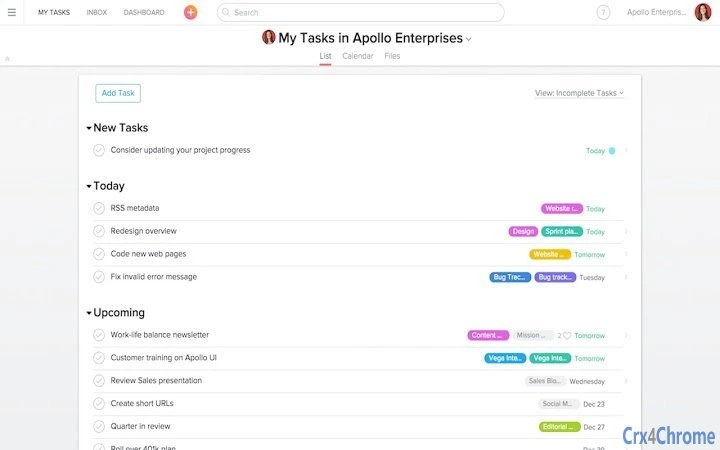
Description
Task Management for Teams with Unlimited Projects
Overview
Asana is a desktop application designed to streamline team collaboration through centralized task and project management. Built for teams of all sizes, it enables users to organize workflows, assign responsibilities, and track progress in a single, unified workspace. The software addresses common challenges such as fragmented communication, missed deadlines, and unclear ownership by integrating tasks, conversations, and file sharing into one platform. It is particularly useful for remote and hybrid teams that rely on digital tools to maintain alignment and accountability.
Target users include project managers, team leads, and collaborative professionals across industries such as marketing, software development, and operations. The free version supports teams of up to 15 members, offering unlimited projects and tasks, making it accessible for small to mid-sized teams. While the developer did not provide additional details about company background, Asana is widely recognized as a leading productivity tool within the Google Workspace and Chrome Apps ecosystem. Real-world use cases include managing campaign timelines, coordinating software releases, and tracking client deliverables with clear visibility across team members.
Key Features & Capabilities
- Centralized Task Management – Create, assign, and track tasks with due dates, priorities, and status updates. Tasks can be linked to projects and viewed across multiple timelines and boards.
- Team Communication in Context – Attach comments directly to tasks, reducing the need for email threads. All discussions remain tied to the relevant work item for full traceability.
- Custom Views and Filters – Build personalized dashboards using list, board, timeline, and calendar views. Apply filters to focus on specific team members, deadlines, or project stages.
- People Views and Workload Tracking – Visualize individual team members’ workloads and task assignments to prevent overcommitment and ensure balanced distribution.
- Asana Inbox and Notifications – Receive real-time updates on task assignments, comments, and due dates. The inbox consolidates all activity to help users stay informed without constant context switching.
- Integration with Google Ecosystem – Seamlessly works with Google Workspace, Chrome Apps, and other productivity tools, enhancing workflow continuity for users already in the Google environment.
These capabilities support efficient planning, execution, and reporting. For example, a marketing team can use custom views to monitor campaign milestones, assign tasks to specific roles, and track deliverables using timeline views. Similarly, software teams can manage sprints, assign bugs to developers, and review progress through board layouts. The platform’s flexibility allows for both simple to-do lists and complex, multi-phase projects.
User Interface, Workflow & Performance
The user interface is clean and intuitive, designed with a focus on clarity and ease of navigation. The layout features a sidebar for project access, a main workspace for task views, and a top toolbar for actions like creating new tasks or switching views. Navigation is consistent across platforms, enabling users to move between projects and tasks with minimal friction.
Workflow efficiency is enhanced by drag-and-drop functionality, keyboard shortcuts, and quick task creation. Users can assign tasks with a single click, set due dates, and tag team members directly in comments. The interface supports multiple display modes—list, board, timeline, and calendar—allowing teams to choose the most suitable format for their workflow.
Performance observations are based on general software behavior patterns. The developer did not specify resource usage details. However, with a 100MB installation size, the application is lightweight and likely optimized for responsive operation on modern systems. Stability appears consistent with similar desktop productivity tools, though exact performance data was not provided.
Compatibility & System Requirements
Asana is available for Windows, Mac, and Linux operating systems. The current version is 2024.05, released on May 15, 2024. The installation package is 100MB in size, indicating a compact footprint suitable for most desktop environments.
Exact system requirements were not listed. Platform compatibility information is limited to the supported OS types. The developer did not provide additional system requirements. Users should ensure their system meets the baseline standards for running desktop applications, particularly those integrated with web services and cloud synchronization.
Pros and Cons
Pros
- Free version supports up to 15 team members with unlimited projects and tasks
- Intuitive interface with multiple view options for different workflows
- Centralized communication reduces email overload and improves transparency
- Strong integration with Google Workspace and Chrome Apps
- Effective workload and accountability tracking through People Views
Cons
- Advanced features require a paid subscription beyond the free tier
- No detailed system requirements provided
- Performance under heavy workloads may vary without official benchmarks
- Resource usage behavior not disclosed by the developer
FAQ Section
Is Asana compatible with Windows, Mac, and Linux?
Yes, Asana is available for Windows, Mac, and Linux operating systems.
Is the software safe to use and secure for team data?
Asana is designed with enterprise-grade security practices. Data is encrypted in transit and at rest, and the platform complies with industry standards for data protection. Users are advised to follow best practices for account security.
Can I use Asana offline?
Asana supports limited offline functionality. Changes made offline will sync once the connection is restored, but full access requires an active internet connection.
How often are updates released?
Asana releases updates regularly, with the latest version (2024.05) published on May 15, 2024. Updates include new features, performance improvements, and security patches.
What type of license does Asana offer?
Asana offers a free plan for teams up to 15 members. Additional features and larger team support are available through paid subscription plans.
Final Thoughts
Asana stands out as a powerful desktop application for teams seeking structured, transparent task and project management. Its ability to centralize work, communication, and accountability makes it ideal for teams that value clarity and efficiency. The free tier offers generous access, allowing small teams to benefit from advanced tools without cost. While some technical details like system requirements and performance metrics are not disclosed, the software’s clean interface, strong integrations, and flexible workflows deliver tangible value.
For teams that rely on digital collaboration and need a reliable system to track progress, Asana is a top-tier choice. It empowers teams to focus on outcomes rather than coordination overhead. Whether managing daily tasks or complex projects, Asana provides the structure needed to keep work moving forward.
Download Asana now
Guides & Tutorials for Asana App for Chrome
How to install Asana App for Chrome
- Click the Preview / Download button above.
- Once redirected, accept the terms and click Install.
- Wait for the Asana App for Chrome download to finish on your device.
How to use Asana App for Chrome
This software is primarily used for its core features described above. Open the app after installation to explore its capabilities.
User Reviews for Asana App for Chrome 0
No reviews found





